

Without Pictoura
- Hundreds of saved videos you never open again
- Screenshots of places with no name
- Maps, notes and blogs in ten different tabs
- Zigzagging across town on the day
AI trip planner & travel map for iPhone
Share any travel video to Pictoura. It finds the cafés, viewpoints and hidden gems, pins them on your travel map and builds your day-by-day itinerary in seconds.



Plan trips anywhere
Sound familiar?
You save the Reel. You screenshot the café. Then you land and can’t find any of it. Pictoura keeps every find and turns it into a plan.
How it works
Three steps from “we have to go there” to a plan you’ll actually use.
Spotted a place on Instagram Reels or TikTok? Tap Share and send it to Pictoura. No more screenshots.
Pictoura’s AI detects the cafés, restaurants, viewpoints and hidden gems in the video and pins them on your map.
Tell Pictoura how many days you have. Get a day-by-day plan with a smart route, then tweak it anytime.
Inside the app
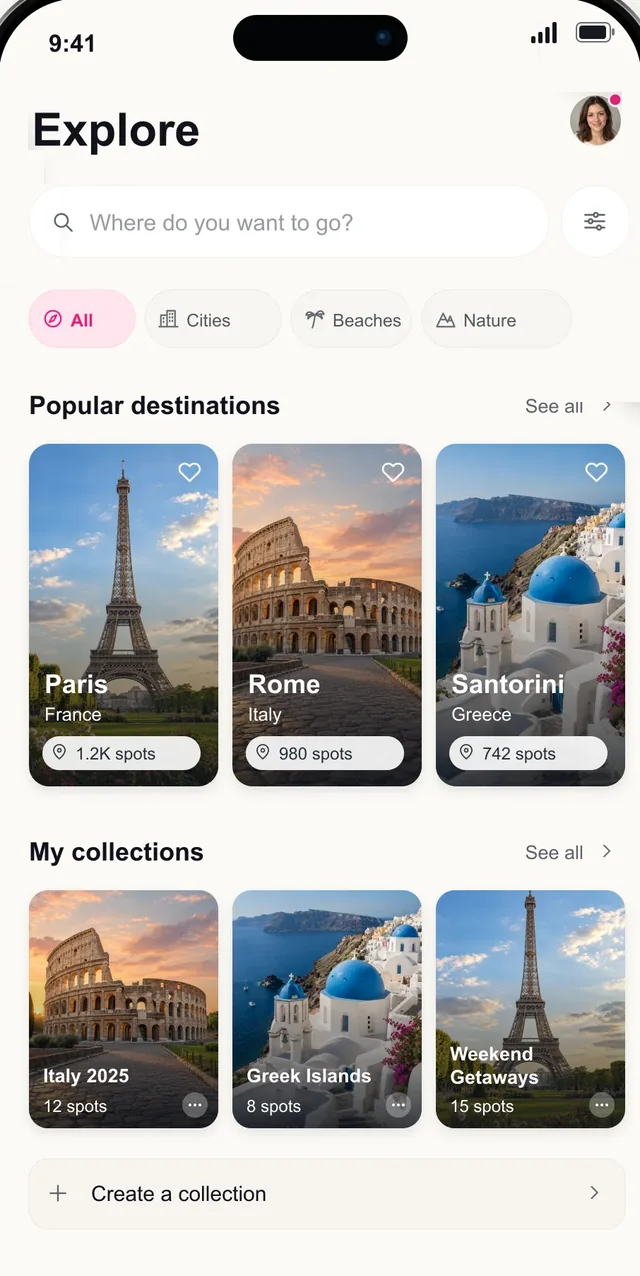
Explore01
Save spots. Build routes. Plan faster.
Browse popular destinations, keep a bucket-list collection for every trip you’re dreaming about and start planning the moment inspiration hits.
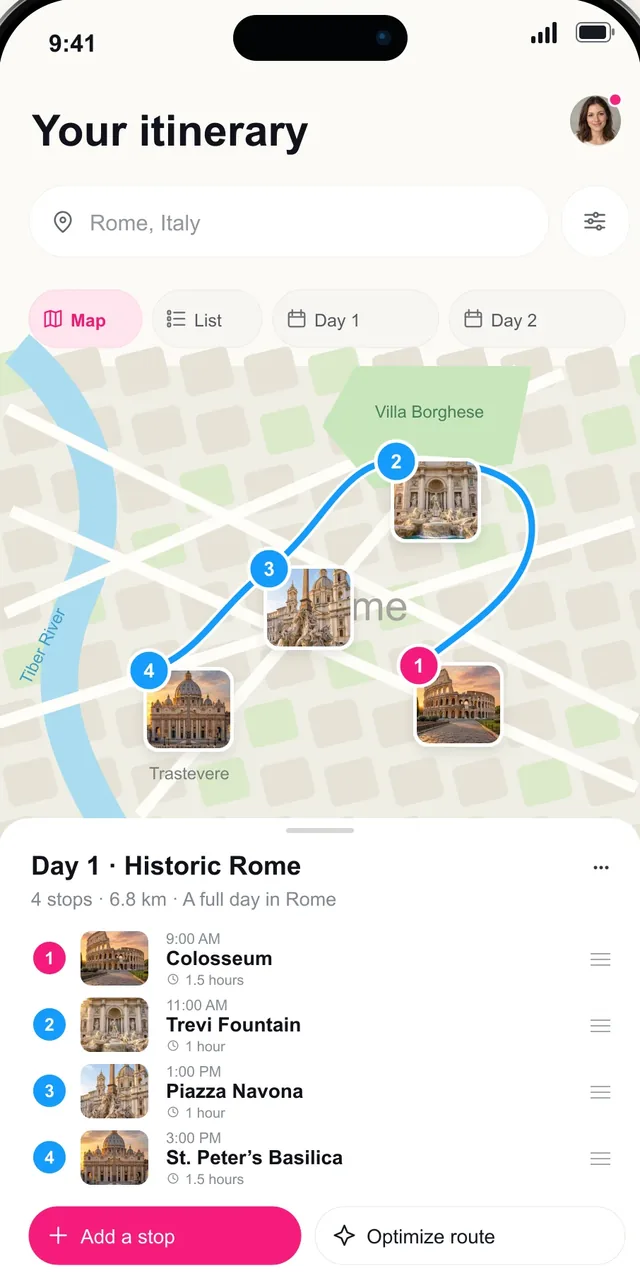
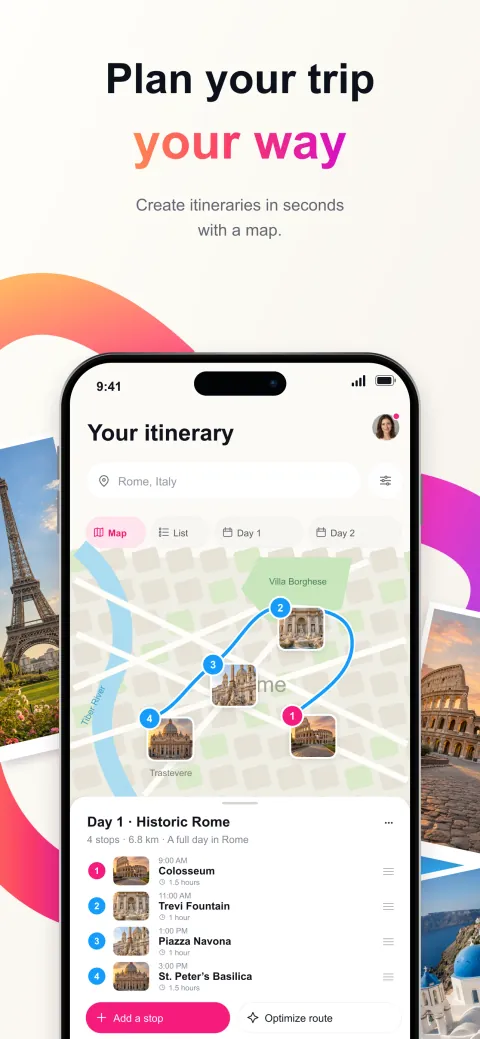
Plan02
Create itineraries in seconds with a map.
See every stop on the map, day by day. Reorder stops, add a place or optimize the route so you never zigzag across town.
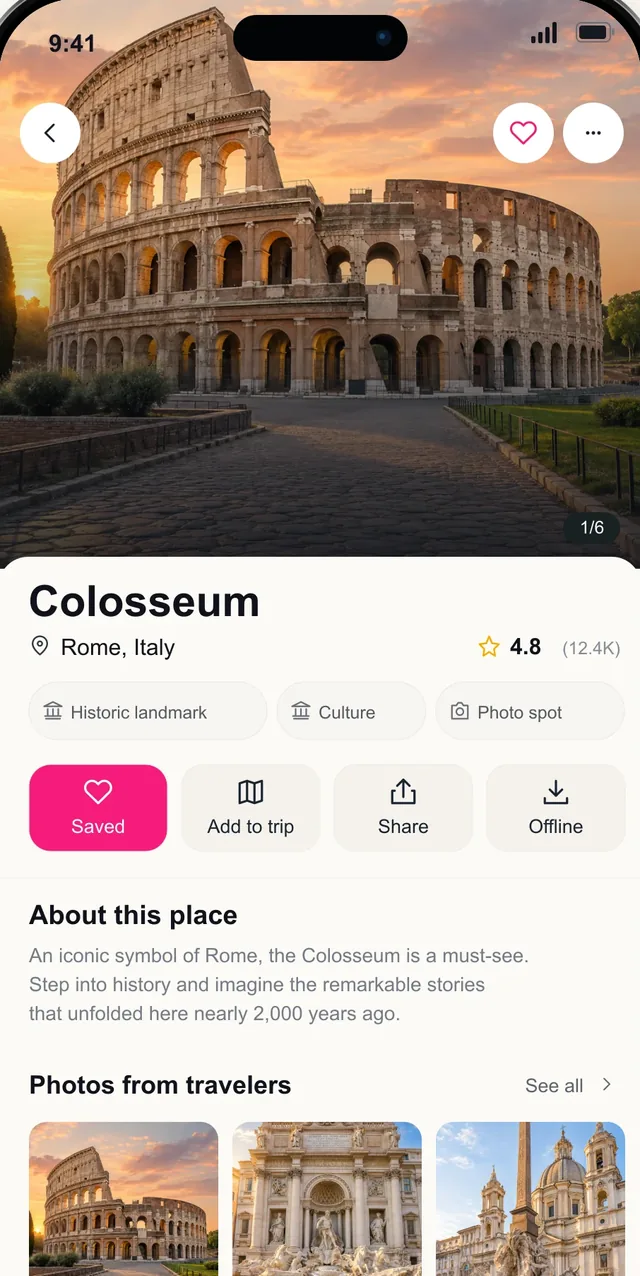
Save03
Restaurants, views, hidden gems, and more.
Every place gets its own page with photos and details. Save it, add it to a trip, share it, or keep it offline for when the signal drops.
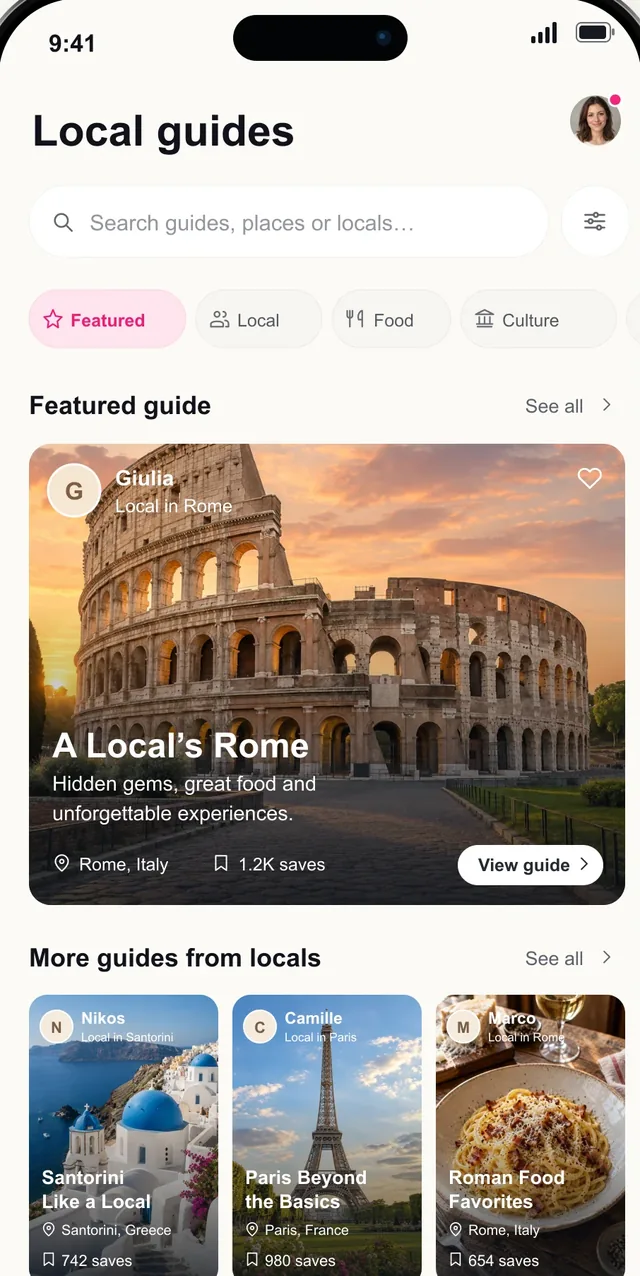
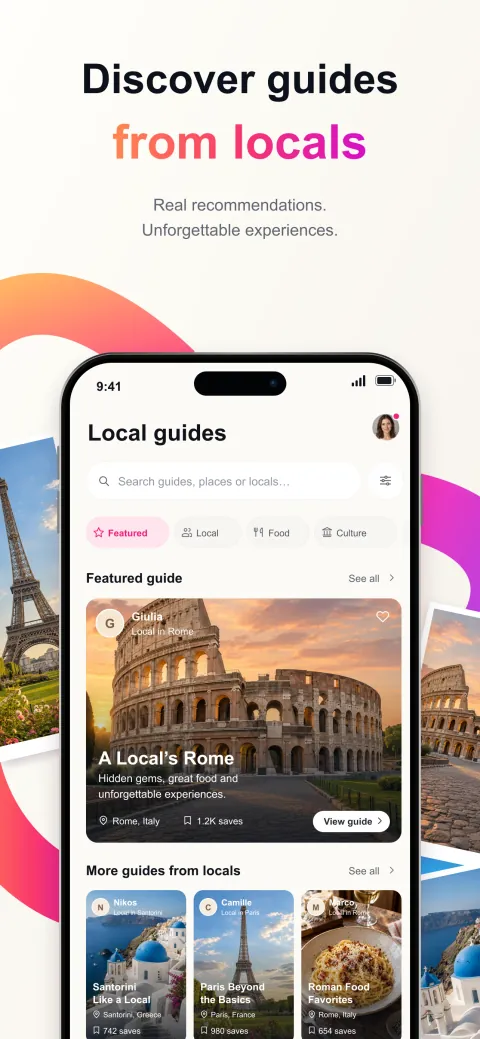
Guides04
Real recommendations. Unforgettable experiences.
City guides written by locals, full of hidden gems and great food, plus photo spots and pose ideas for your best travel pictures.
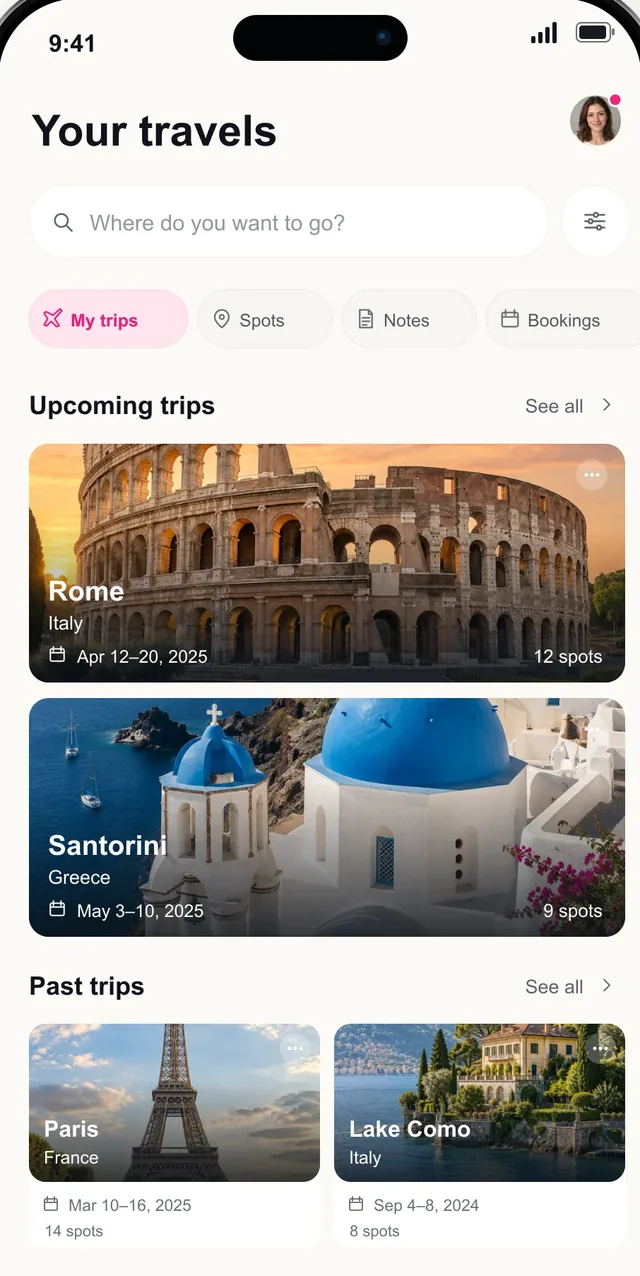
Travels05
Trips, spots, notes and bookings. Everything together.
Upcoming trips, past adventures, notes and bookings in one calm place. Track the countries you’ve visited and share your travel stats.
Features
From the first “we should go” to the last sunset, everything lives in one app.
Share a Reel or TikTok and Pictoura’s AI finds the cafés, restaurants, viewpoints and hidden gems in it.
Every saved place on one travel map, organized into collections by city, trip or bucket list.
Day-by-day itineraries with a smart, optimized route, so you spend less time walking in circles.
City guides written by locals, full of hidden gems, great food and things to do.
Photo spots and pose ideas for your best travel pictures, plus professional photographers in Paris.
Plan solo or as a group and share your itinerary, so everyone follows the same route.
Track the countries you’ve visited on your travel map and share your travel stats.
Save spots and plan trips in any city, anywhere on the globe.
Where to next?
Sample itineraries for four favorite destinations. In Pictoura, your plan is built from the places you save.

3-day sample itinerary
A little history. A lot of pasta.
Plan your Rome tripSample itinerary for inspiration.Day 1
Day 2
Day 3

3-day sample itinerary
Slow mornings. Beautiful detours.
Plan your Paris tripSample itinerary for inspiration.Day 1
Day 2
Day 3

3-day sample itinerary
Blue skies. No rush.
Plan your Santorini tripSample itinerary for inspiration.Day 1
Day 2
Day 3

3-day sample itinerary
A greener kind of getaway.
Plan your Bali tripSample itinerary for inspiration.Day 1
Day 2
Day 3
Made for every kind of trip
Collect the dinners, sunsets and secret beaches you both saved, and plan a trip that feels like you two.
One shared itinerary instead of 300 messages in the group chat about where to eat.
A clear route, saved spots and local tips, so you can wander with confidence.
Two days in one city or a week on the road? Get a day-by-day plan in seconds and make every hour count.
FAQ
Everything to know before your next trip.
Still curious? Download Pictoura free and try it with your next saved Reel.
Download on theApp StorePictoura is an AI travel planner and travel map app for iPhone. It turns the travel videos you save on Instagram Reels and TikTok into real trips: share a video, and Pictoura finds the places in it, pins them on your map and builds a day-by-day itinerary.
Pictoura. It’s a free AI trip planner and travel map for iPhone built for exactly that: share a travel Reel or TikTok, and Pictoura finds the places in it, saves them to your map and turns them into a day-by-day itinerary with an optimized route.
Tap Share on any Reel or TikTok and send it to Pictoura. Pictoura’s AI detects the cafés, restaurants, viewpoints and hidden gems in the video, and every spot lands on your map, ready to plan.
Tell Pictoura how many days you have, whether it’s a weekend getaway, a city break or a two-week vacation. You get a day-by-day itinerary with a smart route, so you never zigzag across town. Reorder stops, add places and optimize the route anytime.
Yes, Pictoura is free to download. Pictoura Premium unlocks unlimited trips, spots, imports and poses. Current prices are shown in the app before you subscribe.
Yes. You can save spots and plan trips in any city, anywhere in the world. Local guide coverage varies by destination.
Yes. Pictoura includes city guides written by locals, full of hidden gems, great food and culture, plus photo spots and pose ideas. Guide coverage varies by destination.
Yes. Plan solo trips or group itineraries, and share your itinerary so everyone follows the same route.
Yes. Pictoura keeps track of the countries you’ve visited on your travel map, next to your trips and saved places, and you can share your travel stats.
Pictoura is available in English, Arabic, Dutch, French, German, Italian, Portuguese, Spanish and Turkish.
Pictoura is available on the App Store for iPhone and iPad with iOS 17.6 or later. An Android version is on the way; join the waitlist to hear when it launches.
Your “one day” starts today
Download Pictoura free and turn the places you’ve saved into a trip you’ll actually take.
 Scan to download on iPhone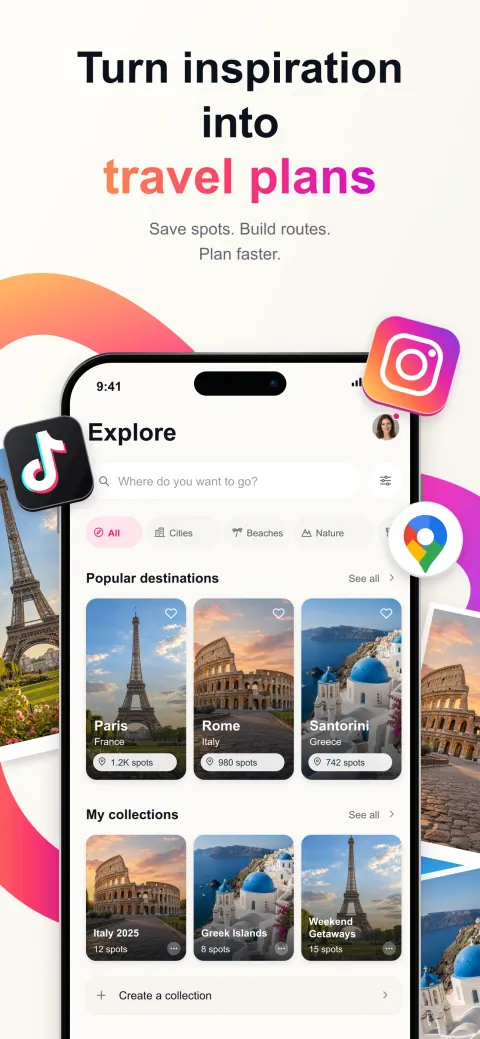


 Paris
Paris